 Kuvo Code
A free, self-hosted
Grok Bot alternative.
Kuvo Code's bots have one job each, like Grok Bot's. They work on your Mac or your own Linux servers instead of a cloud computer, with any model you pick.
Free for personal use, with its source on GitHub. macOS 26 or later, Apple silicon.
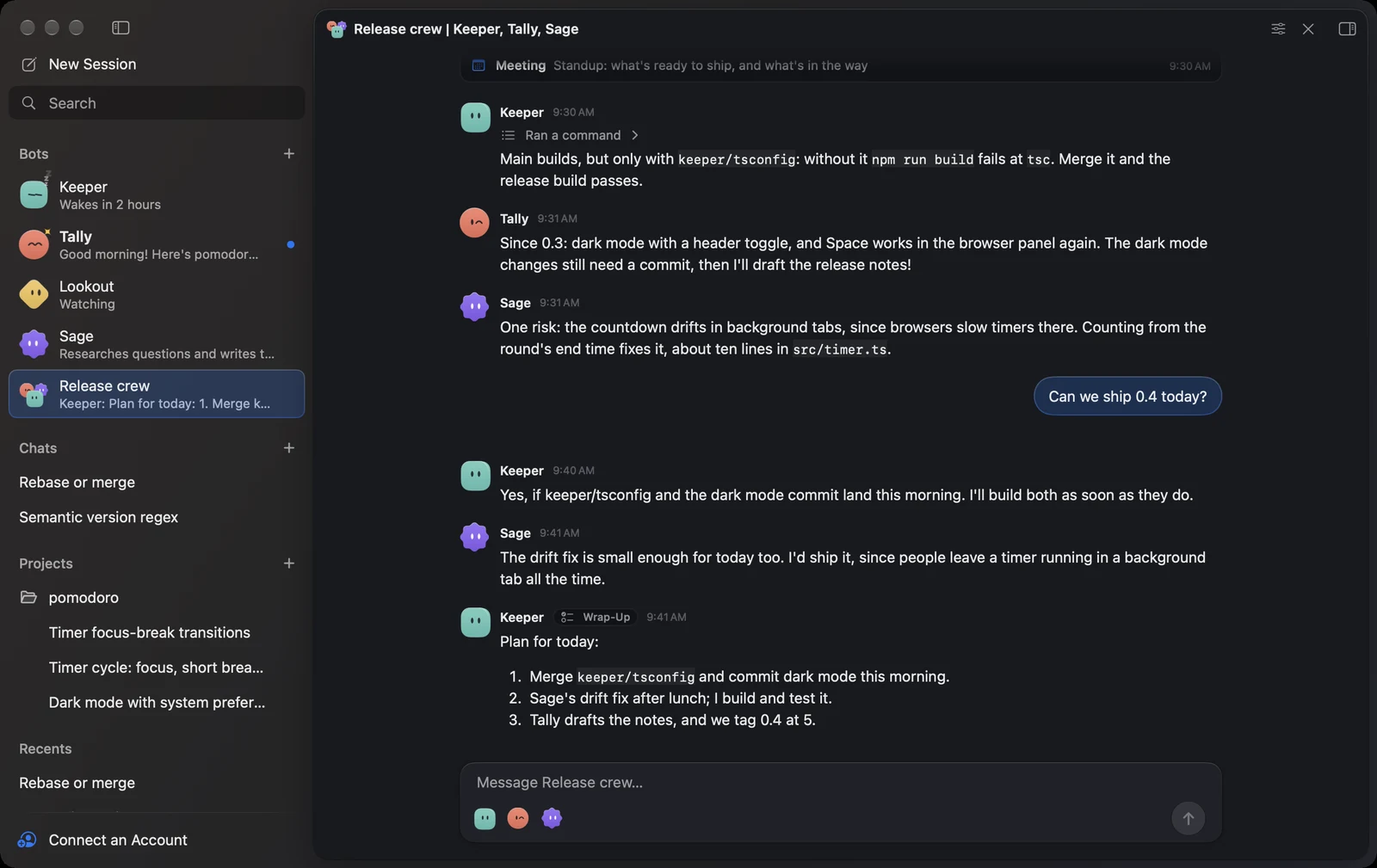
Kuvo Code and Grok Bot.
Side by side.
Both give you AI teammates with one job each that remember, run on a schedule and work together. Where they run, and on which model, is where they differ.
| What | Kuvo Code | Grok Bot |
|---|---|---|
| Where bots work | Your Mac, or your own Linux servers over SSH | One cloud computer in Cursor's cloud, shared by all your bots |
| With your Mac off | Bots on a server keep working and wake themselves up | Keeps working in the cloud |
| Models | Any, picked per bot: Claude Code, Codex, Cursor, Grok and Antigravity on your plans, an API key for any provider, or free models | Chosen for you |
| Price | Free for personal use: you pay your model provider, or nothing with the free models. Commercial use needs a license | Needs a paid Cursor, SuperGrok or Grok Business plan, with usage that resets weekly |
| Source | On GitHub, under the PolyForm Noncommercial license | No public source |
| Memory | A memory file per bot, which you can read and change | Per bot, kept by Grok Bot |
| Schedules | Wake-ups a bot or you set, watches that wake it only when something changes, and group chats that meet on a schedule | Routines on a schedule or after an event |
| Working together | Group chats where bots talk it through, the lead splits up the work and each reports back | Bots message each other, share group chats and hand work off |
| Websites | A browser of its own. It asks you for sign-ins and codes, and fills them in without the model seeing them | Computer use on the cloud computer. You take over for passwords, codes and CAPTCHAs |
| Apps | A native Mac app (macOS 26, Apple silicon) | macOS, Windows, Linux, iPhone, iPad and Android |
Grok Bot as of , from Grok Bot overview, Grok Bot FAQ and VentureBeat on its models. Kuvo Code is an independent project, not affiliated with xAI or Grok Bot.
Give it one job.
It keeps at it.
Like keeping the build green, sending a morning standup or watching a page. A few things it does along the way.
It asks what it's for
A new bot writes first. Name it Social Media Manager and it works out the job itself, asking only what it needs to start.
It wakes only when it matters
Ask it to watch a page or a build. A quick check runs on a schedule, without its model, and wakes it only when something changes.
Your passwords stay yours
When a site wants a sign-in, you type it in a card and it goes straight into the page. The bot and its model never see it.
It moves with its memory
Move a bot from your Mac to a server, or back, with its memory, files, wake-ups and conversation. It carries on where it was.
Coming from Grok Bot?
Good to know.
Is there a free Grok Bot alternative?
Yes. Kuvo Code is free for personal and other noncommercial use. Its bots keep one job each, remember what they learn, wake themselves up and work together in group chats. You pay your model provider for what they use, or nothing with the free models, which need no account. Commercial use, like at work, needs a paid license. Bots →
Is there an open-source Grok Bot?
Grok Bot has no public source. Kuvo Code's source is on GitHub under the PolyForm Noncommercial license: you can read it, build it and use it for free for anything noncommercial, but it isn't an OSI open-source license. If you need one, OpenClaw and Hermes Agent are MIT-licensed agents you host yourself. The source →
Can I self-host Grok Bot?
Its docs offer no way to: Grok Bot's bots work on a cloud computer in Cursor's cloud. Kuvo Code's bots work on your Mac, or on a Linux server you reach with SSH, like a home server or a VPS. There, Kuvo Code keeps everything in one folder, and the bots keep working while your Mac is off. Remote machines →
Can Kuvo Code's bots use Grok?
Yes. Sign in with Grok, with your SuperGrok plan, or add an xAI API key, and pick a Grok model for any bot. Other bots can use Claude Code, Codex, Cursor, Antigravity, GitHub Copilot, any provider opencode supports, or free models. Accounts →
Do bots keep working when my Mac is off?
A bot on one of your Linux servers does: it works and wakes itself up there with your Mac off, and you see what it did when you open Kuvo Code. A bot on your Mac works while your Mac is awake. Memory and wake-ups →
What do I need?
A Mac with Apple silicon and macOS 26 or later. To keep bots working while your Mac is off, a Linux server on x86-64 or ARM64 that you reach with SSH. Installation →
One download.
Then give it a job.
Make a bot, tell it what it's for, and it gets to work.
Download for macOSmacOS 26 or later, Apple silicon.
Your first bot.
- Download Kuvo Code and open it.
- Open Accounts with ⇧⌘K and sign in with a plan you have or add an API key, or pick a free model.
- Click + next to Bots in the sidebar, and start from a ready-made bot or make your own.
- To keep a bot working while your Mac is off, add your server in Settings › Machines, then pick it as where the bot lives.
New to it? Start with the docs →
Everything else Kuvo Code does? See the app →